Showing posts with label post production. Show all posts
Showing posts with label post production. Show all posts
Monday, August 10, 2015
FIX WHITE BALANCE IN PHOTOSHOP
Photoshop is an interesting beast. There's more than one way to do anything. That's the beauty of the software. Of course, which technique you use is based on the situation and personal preference. The same goes for white balance. You could use a grey card, adjust in camera, or just fix it in post. It's up to you and what functions best for your workflow.
Personally, when I shoot, I'm mostly shooting based on the relative area of my light source. Meaning, if it's tungsten, I'm shooting based on that. It typically gets me in the right area and I can adjust in post because I'm shooting RAW. Some times I do a custom white balance with an ExpoDisc, but I've been doing that much less. My white balance now is usually being corrected in post.
Here's a neat trick to add to your bag of tricks for correcting white balance in Photoshop. Create a new layer, fill with 50% grey, and set the blend mode to difference. Next, create a threshold adjustment layer and drag your right slider nearly all the way to the left. Basically until you there are just a few areas in black. These are your midtones and closest to 50% grey. Use your handy color selector tool and select a point in one of those areas. Now, hide the grey and threshold layers and create a curves adjustment layer. Grab the grey point sample too, which is the one in the middle, and select the very same point you created before, the one in the midtones, and feast your eyes on corrected white balance beautifulness.
This trick seems a little long, but hey, it works. And it's another tool to add to your bag of tricks. Check out the video above for a very nice walk through.

Thursday, July 30, 2015
BLACKMAGIC WANTS YOU TO BE A VIDEO EDITOR!
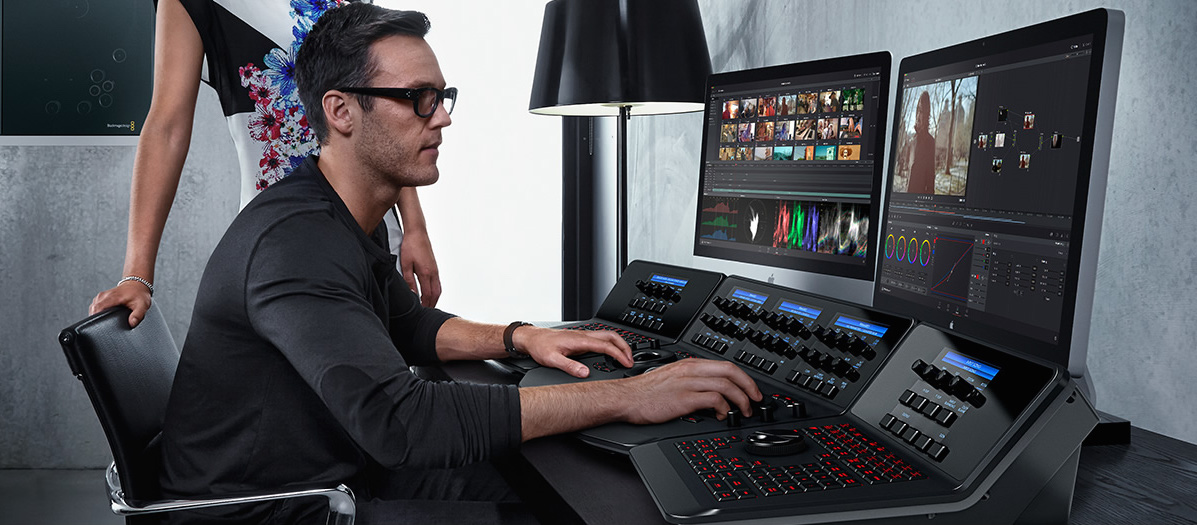
I'm a fan of BlackMagic. They're a great company with a great line of products. Their cinema cameras are fantastic. Especially for the budding filmmaker. The cost of buying is so cheap, and rentals on them are even better. Their post-processing software, DaVinci Resolve, is a beautiful piece of software which turns out amazing results. What's not to like?
Earlier this year BlackMagic announced the recent update to DaVinci Resolve, and now they want to share it with you. For free! Yep, you heard me right. Granted, there has been a free version since Resolve 11 (the update available is 12), but BlackMagic is doing a great job of pushing this out there. They want you to be a video editor! So give it a try.
DaVinci has widely been a choice for color grading in Hollywood for a while. Many of the editors that I've spoken with really enjoy it. The free version doesn't give you the full functionality of the pro version, which is $995, but for those in the market for a free software don't really need to be concerned with 4K output and such. For a full list of specs and info check out the BlackMagic site. Oh, and by the way, that awesome looking workstation, is $29,995. My wallet just exploded.
Friday, July 24, 2015
IF PHOTOSHOPPED IMAGES OFFEND YOU, GET READY FOR RETOUCHED VIDEO!
Recently I did a post on retouching, and I also recorded a podcast for The Composite Creative, which should be appearing soon, on the subject of retouching. It seems this is such a touchy subject for people, and honestly it cracks me up to hear people trash photoshop's use in retouching beauty images, ads, and fashion campaigns, and yet they have no problem looking at the beauty that's placed before their eyes in films and television. Add to that, they have no issue dressing themselves up for a particular occasion that includes tons of makeup, cloths that give one a slim appearance, and choosing to accentuate certain features....Pot, I'd like you to meet Kettle.
Rousselos Aravantinos recently challenged himself to remove 30 years of age from a middle aged woman in real time. He admits that he's a novice, but I have to say he did a fantastic job. He shot this on a Nikon V1 and did the post processing in Nuke. I have heard of Nuke, but never spent any time with it or educating myself on it.
This kind of thing opens up a whole new can of worms for those trolls on-line.
Monday, July 20, 2015
ROCKET ROOSTER'S FILM EMMULTION PACK IS CHEAPER ALTERNATIVE TO VSCO

The art of photography is priceless and the cost of creating it is nearly the same. Cameras, lenses, speed lights, strobes, modifiers, software, plugins. The list goes on and on. Finding budget friendly options isn't always easy, especially when it comes to quality. One company is specifically tackling that problem. Rocket Rooster is that company.

Rocket Rooster is a digital filter company that produces incredibly affordable plugins for Adobe's Creative Suite. They first produced a number of different styles for cinema purposes and the quality looks pretty good. They then decided to set their focus on creating products for photographers using Lightroom and they're latest release, the Analog Film Pack, just might give VSCO a run for it's money, or rather your money.
The pack includes 20 old school film presets with over 100 variations there after. Like the VSCO, Rocket Rooster's film emulations allows digital photographers "to create the subtle nuances in color, texture and feel of analog photography." Within the variations you'll find expired and faded rolls, and Rocket Rooster even threw in some cinema film stocks for some really unique looks. For a full list of what's included in the pack, check that out here.
 |
| FJ Provia 400X Alt |
 |
| Kodak 400 TX |
 |
| Ektachrome E100 GX |
 |
| Agfa Vista 800 |
 |
| FJ Provia 400X |
 |
| Kodak Ultra 400UC |
 |
| FJ Velvia 100 |
VSCO has long been the heavy weight champion when it comes to the world of film emulations. I have them. I use them. They're beyond amazing! But, let's face it. They're not cheap. Their emulation packs cost $119 each and that can add up if you're interested in getting your hands on as many options as possible. That's money many of us could put towards new gear or just your daily bills.
Like the VSCO, Rocket Rooster's film emulations allows digital photographers "to create the subtle nuances in color, texture and feel of analog photography." But the cost is significantly less. If you're interested, you can pick up the pack for $35 (as a promo the RR is offering it discounted to $26 for the launch, but you'll have to act quickly. I believe it's only for a week.) These emulations look great to me and you can't beat the price.
Subscribe to:
Posts (Atom)